On this page
Wix can't limit a coupon to first-time customers, so a first-order discount takes two moves: get the code in front of new people only, and limit what it costs when it reaches someone else. Show it in a pop-up only new visitors see, send a unique single-use code in a welcome email, or send it only to contacts who haven't bought, and give the coupon one use per customer, an end date and a minimum order.
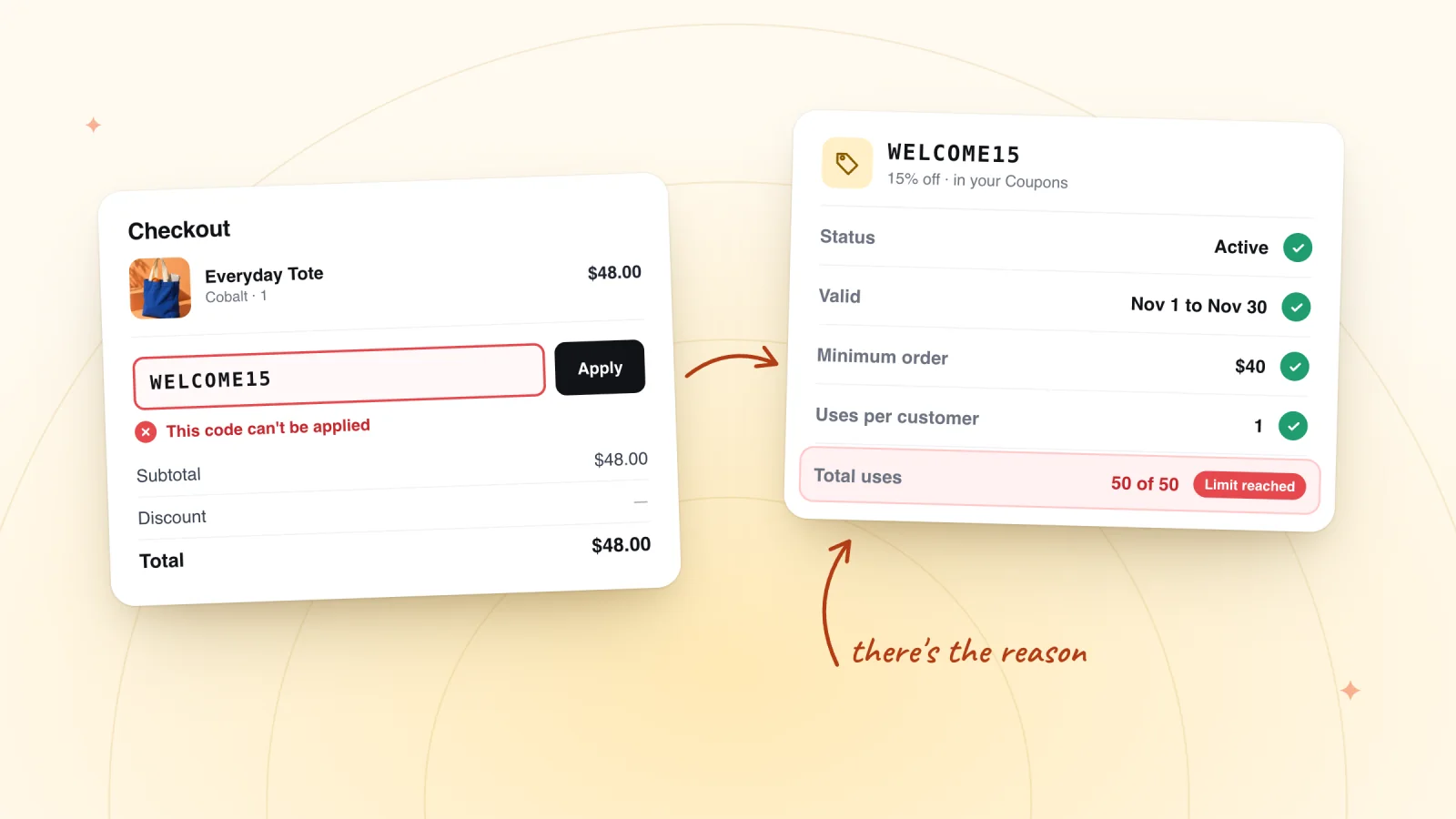
Wix's help center says it's currently not possible to create a coupon for first-time customers, and the page is still a feature request collecting votes. A Wix coupon checks its dates, limits, minimum order and the items it covers, and never whether the shopper has ordered before.
Key takeaways
- Wix can't limit a coupon to first-time customers. Its help center lists it as a feature request, so no coupon setting checks order history.
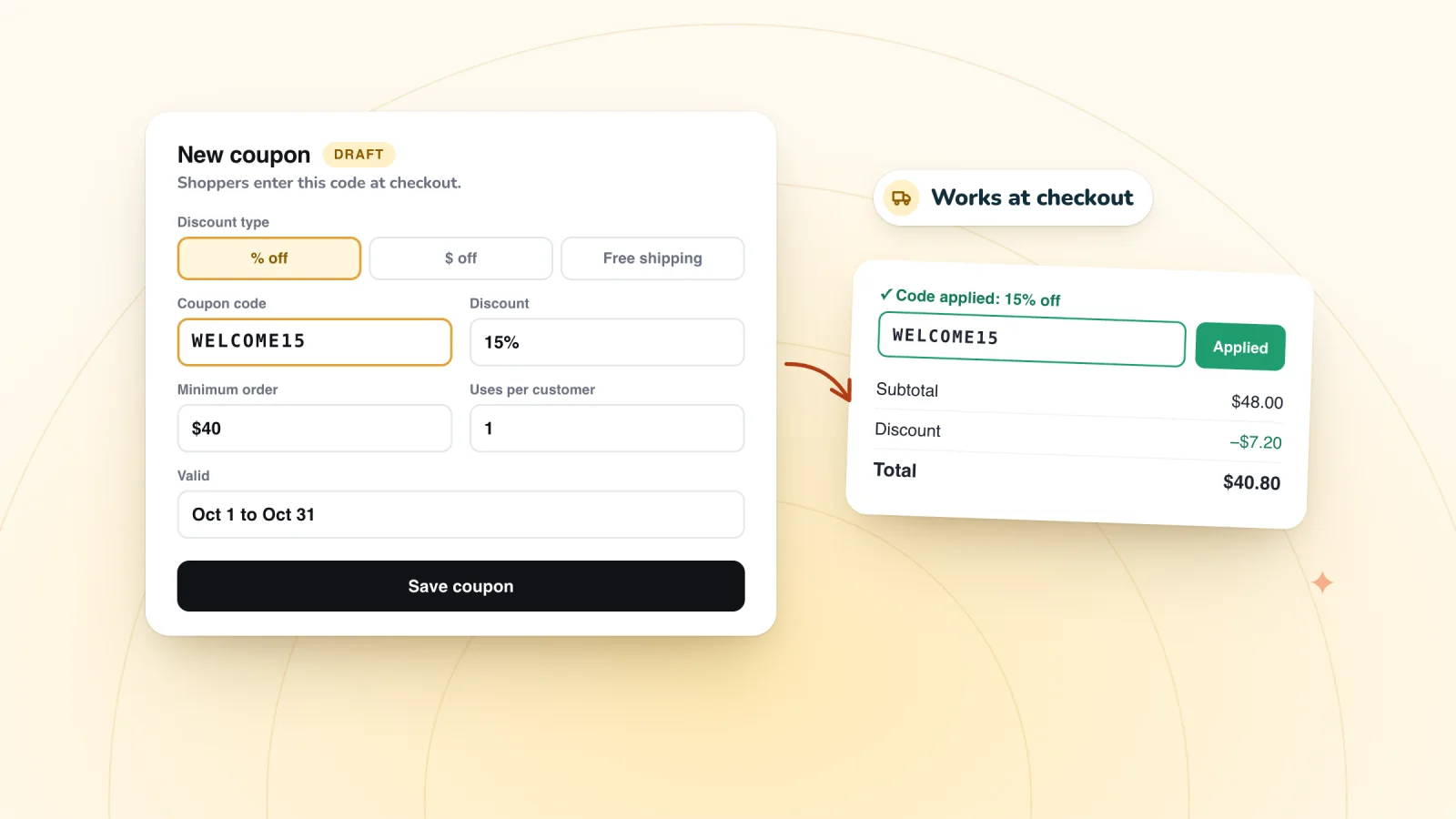
- The closest settings are Limit to one use per customer, an end date and a minimum order subtotal, which cap the cost rather than check who is new.
- For one code per person, send a unique single-use coupon in a Wix Automations email; for a game, show the pop-up only to new visitors.
- Work out what share of code users must be genuinely new: at 15% off a $50 order with $25 of margin, it's 30 in every 100.
- Call it a welcome offer for new subscribers unless you can enforce first order only.
What coupon settings can and can't do
Each setting caps the cost in its own way, and each leaves a gap. Every setting below is in the coupon form under Coupons in your dashboard.
| Setting | What it stops | What it doesn't stop |
|---|---|---|
| Limit to one use per customer | The same customer using the code twice | A past customer using it once |
| End date | The code working after the offer ends | Anyone using it before then |
| Minimum order subtotal | A big discount on a small order | Repeat buyers above the minimum |
| Limit the total number of uses | More than the number of redemptions you set | Which shoppers those are |
| Unique codes, one per person | One code spreading to many people | A past customer receiving one |
Wix doesn't say how it recognizes the same customer for the per-customer limit, so treat it as protection against casual reuse rather than a guarantee.
For where each of these sits in the form, see how to create a Wix coupon, field by field.
How do you offer a discount only to new customers on Wix?
Control who gets the code, since the coupon itself can't tell who is new: show a welcome pop-up only to new visitors, send each new subscriber a unique single-use code with Wix Automations, or send a code only to contacts whose number of purchases is 0. The three routes differ in how close they get to "first order" and how much setup they take, and you can run more than one.
1. A welcome pop-up that new visitors see
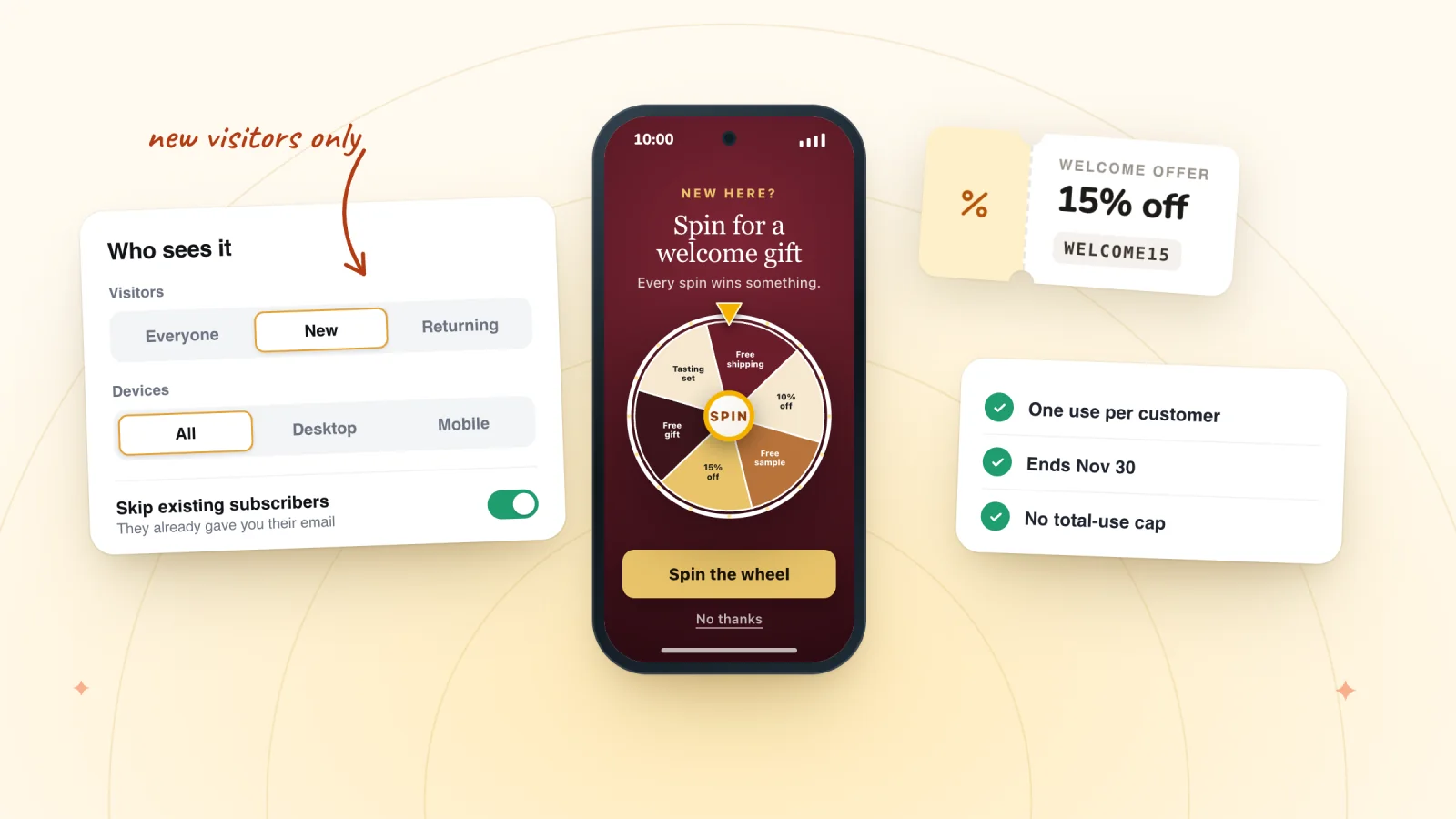
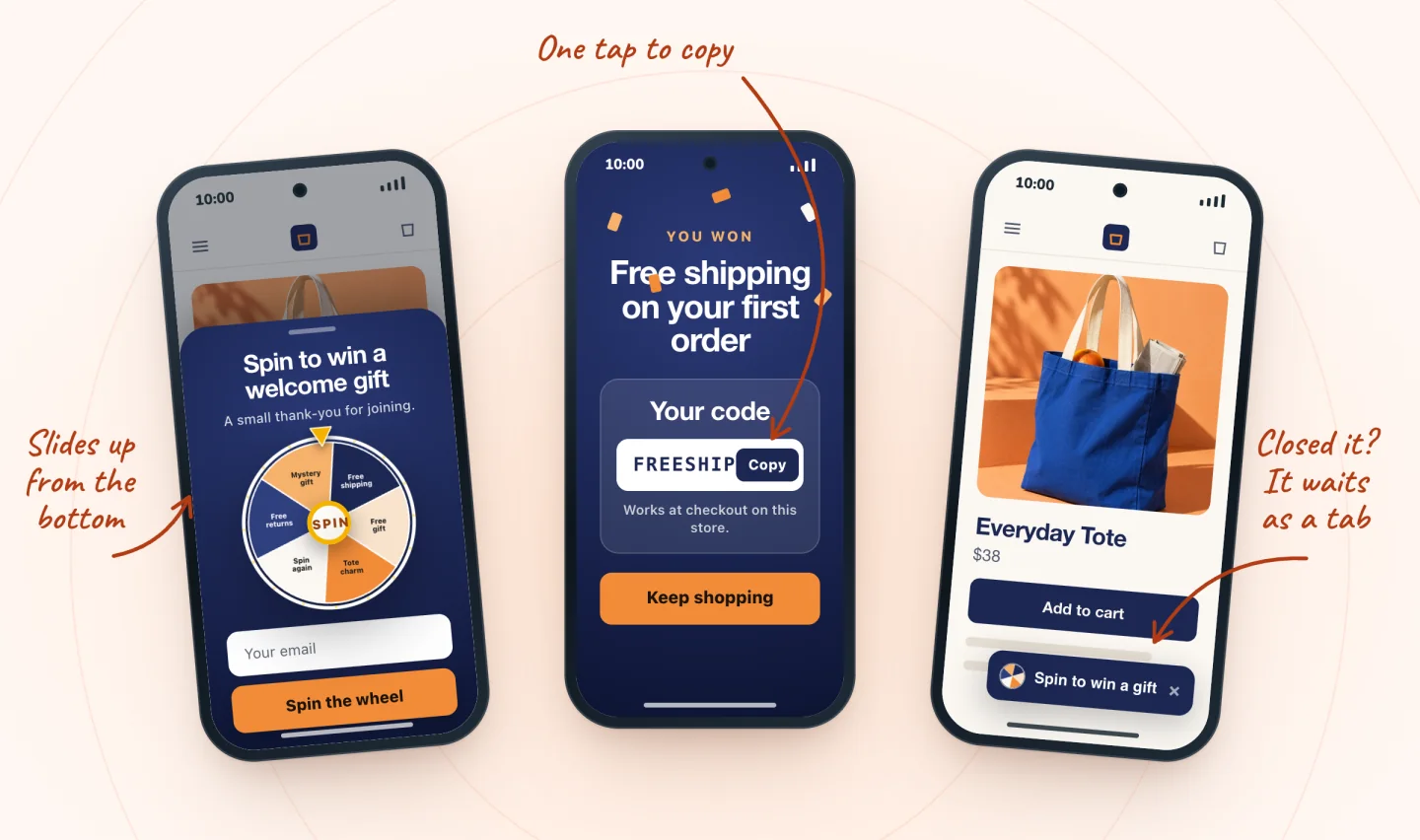
A pop-up can't see order history either, but it can choose who it appears to. In Spin Wheel, open the pop-up and, in When & who under Who sees it, set Visitors to New. The pop-up then appears only in a browser that Spin Wheel hasn't seen on an earlier visit. Skip existing subscribers is on by default, so anyone who has already signed up in that browser isn't asked again.
The prize codes are your own coupons, and every winner of a prize shares its code. Give each prize coupon an end date, tick Limit to one use per customer, add a minimum order to dollar-off prizes and leave the total-use limit off, so a later winner's code isn't refused.
What it doesn't do: a past customer on a new phone, a different browser or a private window counts as a new visitor.
2. A unique code in a welcome email
Wix Automations can send each new subscriber their own single-use code, with no app:
- Create the coupon the automation will send. Tick Limit to one use per customer, give it an end date far enough out to cover the campaign, and leave the total-use limit off. Wix says the automation stops working once the coupon's end date or use limit is reached.
- Add a subscribe form to your site: Add Elements, then Contact & Forms, then drag a form from the Subscribe section. It can sit in a Popup, a footer or a page.
- Go to Automations, click + Create Automation, then + Start from Scratch. Choose Form submitted as the trigger, pick Specific and select your subscribe form. Turn on Trigger once per person if you want one code per contact.
- Click +, then Action, then Add a coupon. Choose Unique single-use coupon code, then click + Select and pick your coupon.
- Click +, then Action, then Send an email, and click Edit to open the email. Place the cursor where the code should go, click + Add Personalized Content, search for "coupon" and add Coupon code. Check that Set recipients uses Emails from trigger, then click Activate.
Each code works once, so a forwarded code dies after one order. A past customer who subscribes with a new address still gets one. Send yourself the email with a test sign-up before you promote the form. If it doesn't arrive, these fixes for a Wix coupon or welcome email that won't send cover the usual causes.
3. A code only for contacts who haven't bought
This is the closest Wix gets to "first order". Wix Contacts can group people into segments by site activity, including their number of purchases. Go to Contacts, click Manage Segments, then + Create Segment and + Start from scratch, and add a filter for contacts whose number of purchases is 0. Segments update on their own, so a contact who buys drops out. Wix Automations can start from Contact enters segment, so you can build the same two actions as above, Add a coupon and Send an email, on that trigger.
The code then goes only to contacts Wix knows haven't ordered, and each code still works once. The gap is the same as before: someone who bought under one email address looks new under another. Test the segment with your own address first, and check who's in it before you switch the automation on.
Beyond coupons: an automatic discount
Automatic discounts need no code for shoppers to type, and Wix lets you limit one to specific segments, members or contacts with a label. Wix's article doesn't say how a shopper who isn't logged in is matched at checkout, so test that with a logged-out order before relying on it.
For a true rule, a developer can write a custom trigger with Velo that decides when an automatic discount applies. Wix's tutorial for the Custom Discount Trigger service plugin uses a happy-hour discount as its example. Whether your trigger can see enough about the shopper to check past orders is a question for your developer.
Hand out codes that work at checkout
Every prize is one of your store's coupons. Winners see the code on screen, one tap copies it, and winners who gave an email get a backup copy.
Add to site, it's free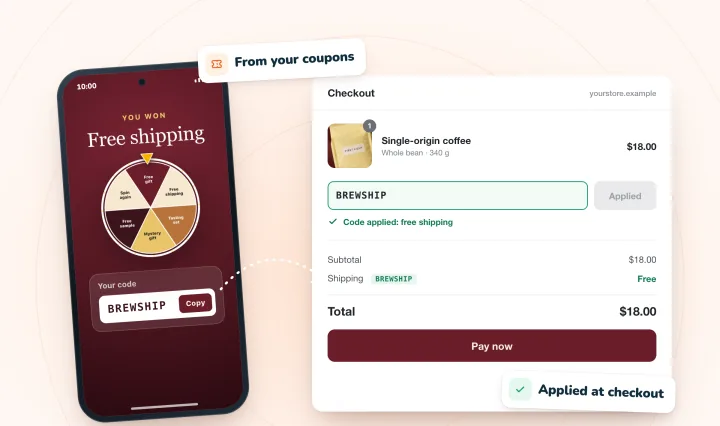
What does a first-order discount cost?
The real cost is the discount you give people who would have bought anyway, not the discount on new customers. At 15% off a $50 order that leaves you $25 after costs, the code pays only if at least 30 of every 100 people using it wouldn't have ordered otherwise, as the example below works out.
Say your average first order is $50 and you keep $25 of it after product and shipping costs. A 15% welcome code gives away $7.50, so a discounted order earns $25 − $7.50 = $17.50.
Now suppose 100 shoppers use the code:
- 40 wouldn't have ordered without it. They earn 40 × $17.50 = $700. The other 60 would have paid full price, so the code costs you 60 × $7.50 = $450. You're $250 ahead.
- Only 20 are genuinely new orders. They earn 20 × $17.50 = $350, against 80 × $7.50 = $600. You're $250 behind.
The break-even point is where the two sides match: 17.50 × new = 7.50 × (100 − new). That gives 25 × new = 750, so new = 30, or 30 in every 100. The better you keep the code away from existing customers, the easier that bar is to clear.
To run your own numbers, use this calculator for a discount's break-even point. For a wheel with several prizes, the spin wheel odds calculator works out the average prize cost. If 15% feels steep, these welcome offers beyond 10% off cost less per order.
Loopholes, and how to close them
- A new email, the same person. No coupon setting stops a past customer from signing up again under another address. Keep the offer modest, and add a minimum order, so a repeat buyer using it still costs you little.
- A shared code on coupon sites. A code everyone can see can travel. End dates and one use per customer contain a shared code, and unique single-use codes stop working after one order. See why a shared code spreads, and how to contain it.
- Stacking with a sale. Shoppers can use one coupon per order, but Wix says a coupon and an automatic discount can both apply. During a sitewide sale, try the welcome code on a test cart and check the combined discount still leaves a margin.
- A promise you can't keep. If the fine print says "first order only," Wix still accepts the code from a past customer, so the rule is one you can't enforce. Call it a welcome gift for new subscribers, and size it so it's fine if a regular uses it. For fine print that matches what the coupon really checks, start from a coupon terms template built on Wix's settings.
For codes you hand out yourself, such as printed inserts, Wix's free Bulk Coupon Creator copies one coupon into up to 1,000 coupons with unique codes. It can generate the codes, or take your own list as a CSV, with the codes in column A of Wix's template. Our random coupon code generator makes a list without look-alike characters, ready to paste in.
Frequently asked questions
Can I create a coupon for first-time customers only on Wix?
No. Wix's help center says it's currently not possible to create a coupon for first-time customers and lists it as a feature request. The closest you can get is a coupon limited to one use per customer, with an end date and a minimum order, sent only to new subscribers or shown in a pop-up only to new visitors.
What's the closest Wix setting to a first-order coupon?
Limit to one use per customer. It stops the same customer using the code twice, though it doesn't stop a past customer using it once. Pair it with an end date and, for dollar-off codes, a minimum order subtotal. To make each code work only once in total, send unique single-use codes with Wix Automations.
How do I send each new subscriber their own discount code on Wix?
Create a coupon, then build an automation with the Form submitted trigger for your subscribe form. Add an Add a coupon action set to Unique single-use coupon code, then a Send an email action with the coupon code added as personalized content. Wix says the automation stops once the coupon's end date or use limit is reached.
How do I know if a first-order discount is worth it?
Work out what share of the people using the code wouldn't have ordered without it. Say a $50 order leaves you $25 after costs and the code is 15% off, or $7.50. Each extra order earns $17.50, and each order that would have happened anyway loses $7.50, so the code breaks even when 30 in every 100 users are genuinely new.
Try it on your store
For a welcome game that only new visitors see, Spin Wheel's welcome-offer pop-up built on your own coupons can skip returning visitors and anyone who has already signed up.

Sources
- Wix Stores Request: Creating Coupons for First-Time Customers
- Limiting Coupon Usage
- Creating a Coupon With a Minimum Order Amount
- Wix Stores: Offering Discounts and Coupons
- Wix Automations: Adding and Sending a Coupon
- Wix Forms: Creating Automated Email Responses for Form Submissions
- Wix Forms: Adding and Setting Up a Subscribe Form
- Wix Contacts: About Segments
- Wix Contacts: Creating and Managing Segments
- Creating Standard Automatic Discounts
- Tutorial: Custom Discount Trigger Service Plugin
- Adding and Setting Up the Bulk Coupon Creator App

We build marketing apps for online stores: myuser.ai writes and sends emails and texts from a store's own products, and we make Spin Wheel and Session Recordings for Wix sites. Product details in our guides are checked against the apps themselves.