
A spin-to-win pop-up for Shopify and Wix stores, with prizes that work
Shoppers spin a wheel of your prizes, see what they won, then sign up to claim it. You set the slices and the odds, our servers draw every prize, and every code is one of your store's own discount codes.
Opens the Shopify App Store or the Wix App Market. No card needed.
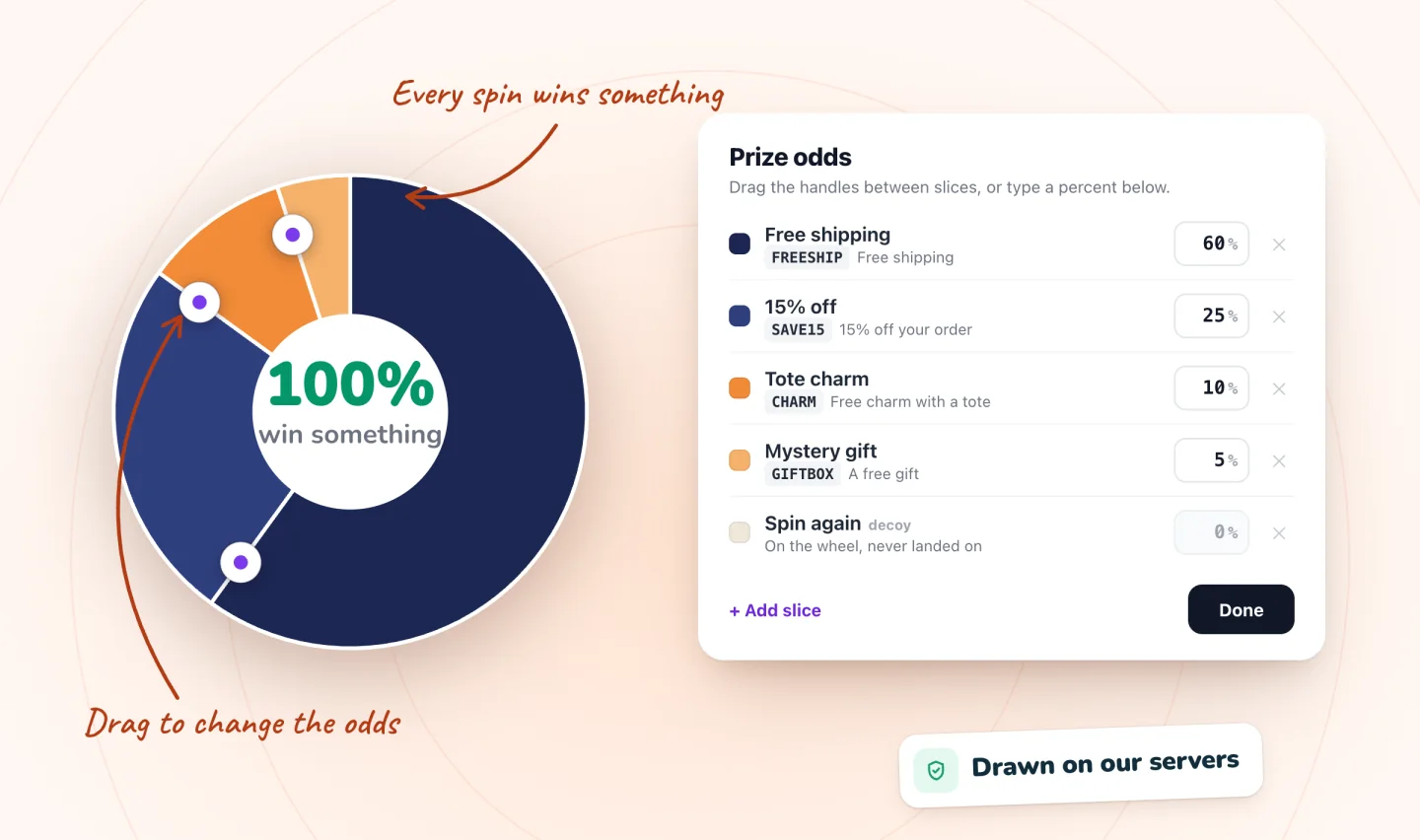
Slices, odds and a fair draw
A spin-to-win pop-up, also called a spin-the-wheel discount, spinning wheel, lucky wheel, prize wheel or wheel-of-fortune pop-up, turns a sign-up form into a quick game. Here's what Spin Wheel does at each step.
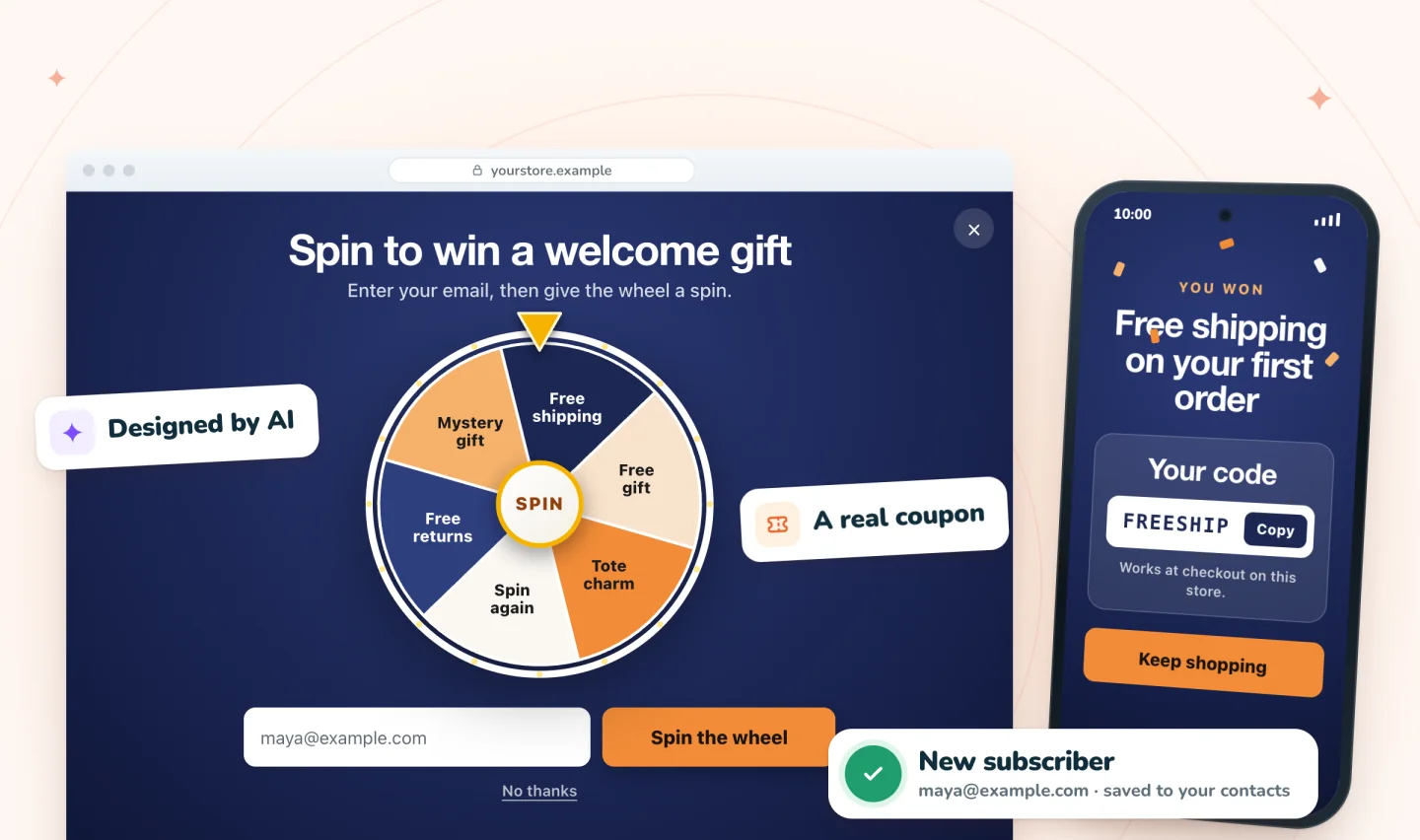
Spin first, sign up to claim
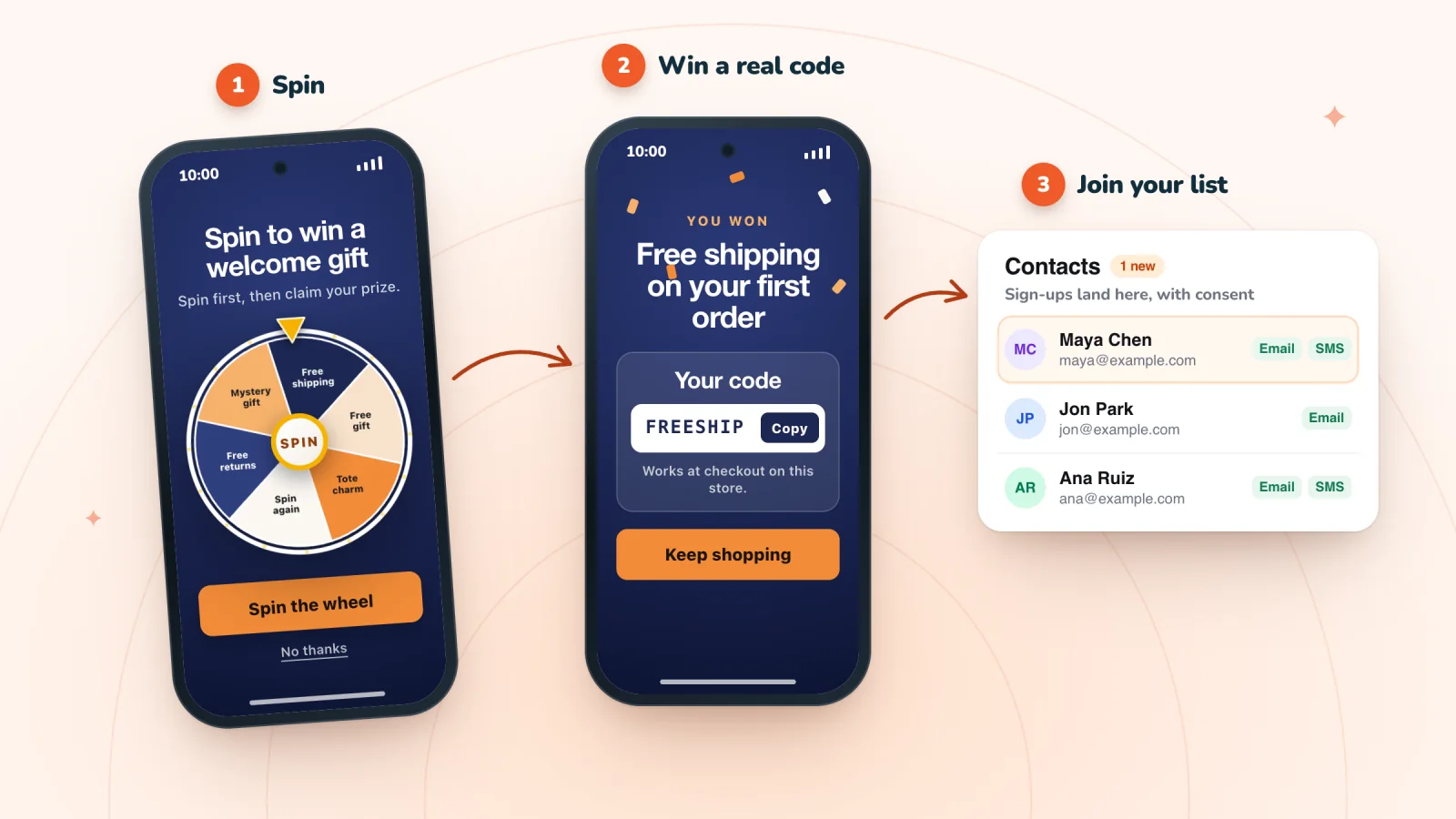
By default the wheel is ready to play the moment the pop-up opens. The shopper taps to spin, the wheel turns for about five seconds and stops on their prize, and then they enter an email or phone number to claim it. Prefer to ask first? Switch it to sign up before the spin.
- A revealed prize stays claimable for 24 hours by default, and you can choose from 1 hour to 7 days
- The code shows in the pop-up, and one tap copies it
- Winners who gave an email also get a backup copy by email
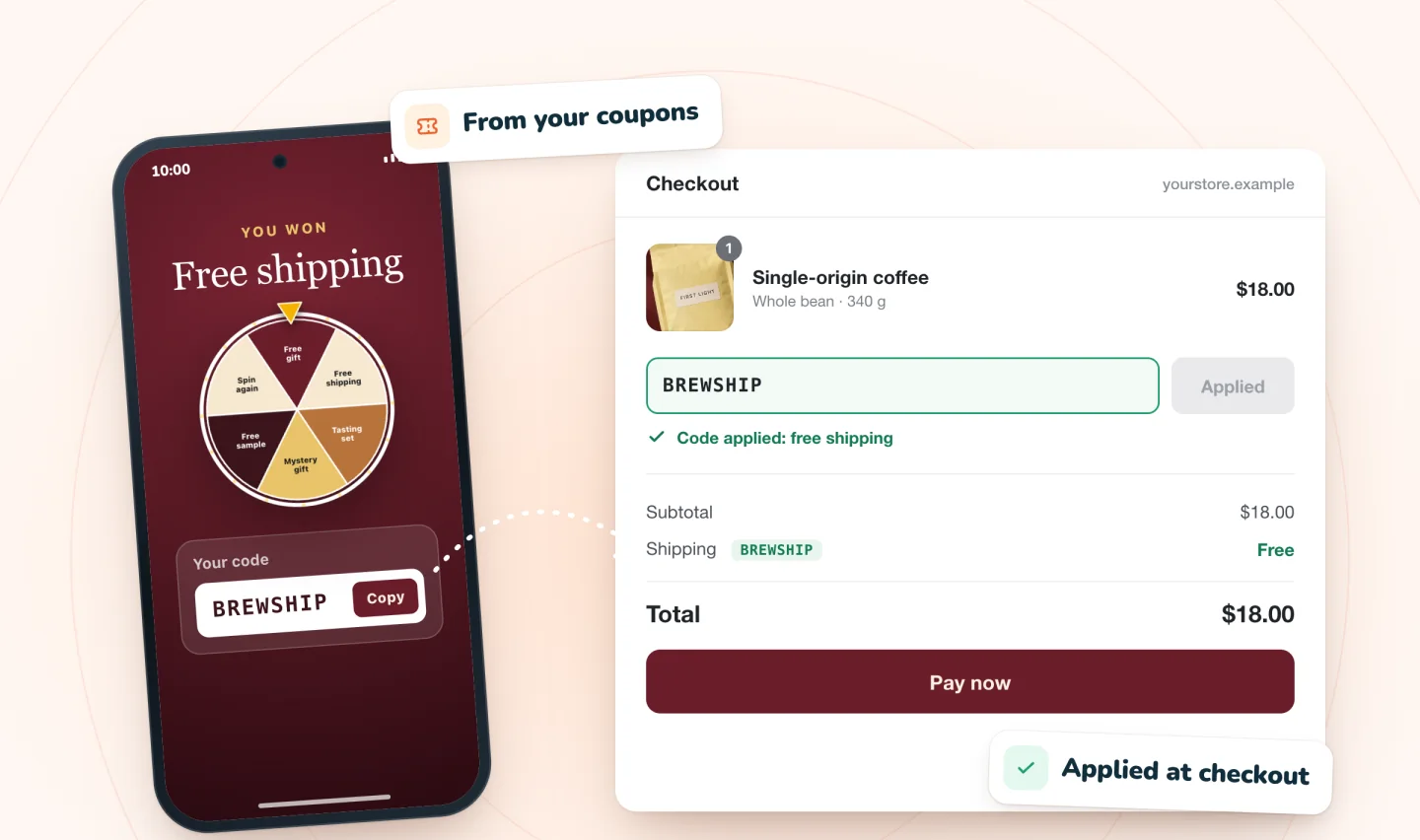
Every slice is one of your codes
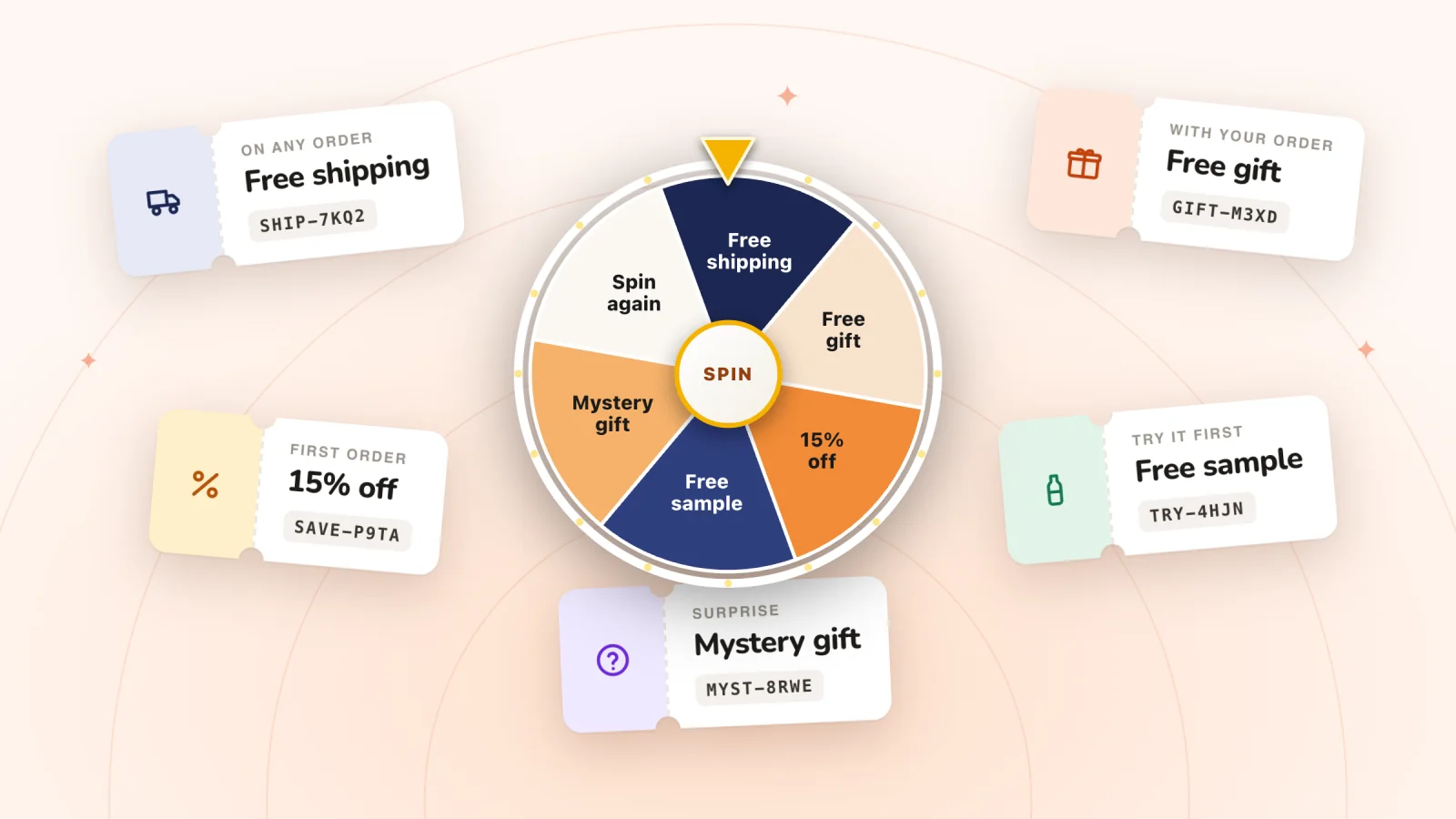
Each prize points to one of your store's own discount codes (on Wix, coupons), such as free shipping, a percentage off or an amount off, so the code works at your normal checkout under the rules you set. Everyone who wins a prize gets that code, so give prize codes an end date and one use per customer.
- Pick any of your discount codes for each prize
- No codes yet? Spin Wheel can create three starter ones
- A code capped at one use in total can't be a prize
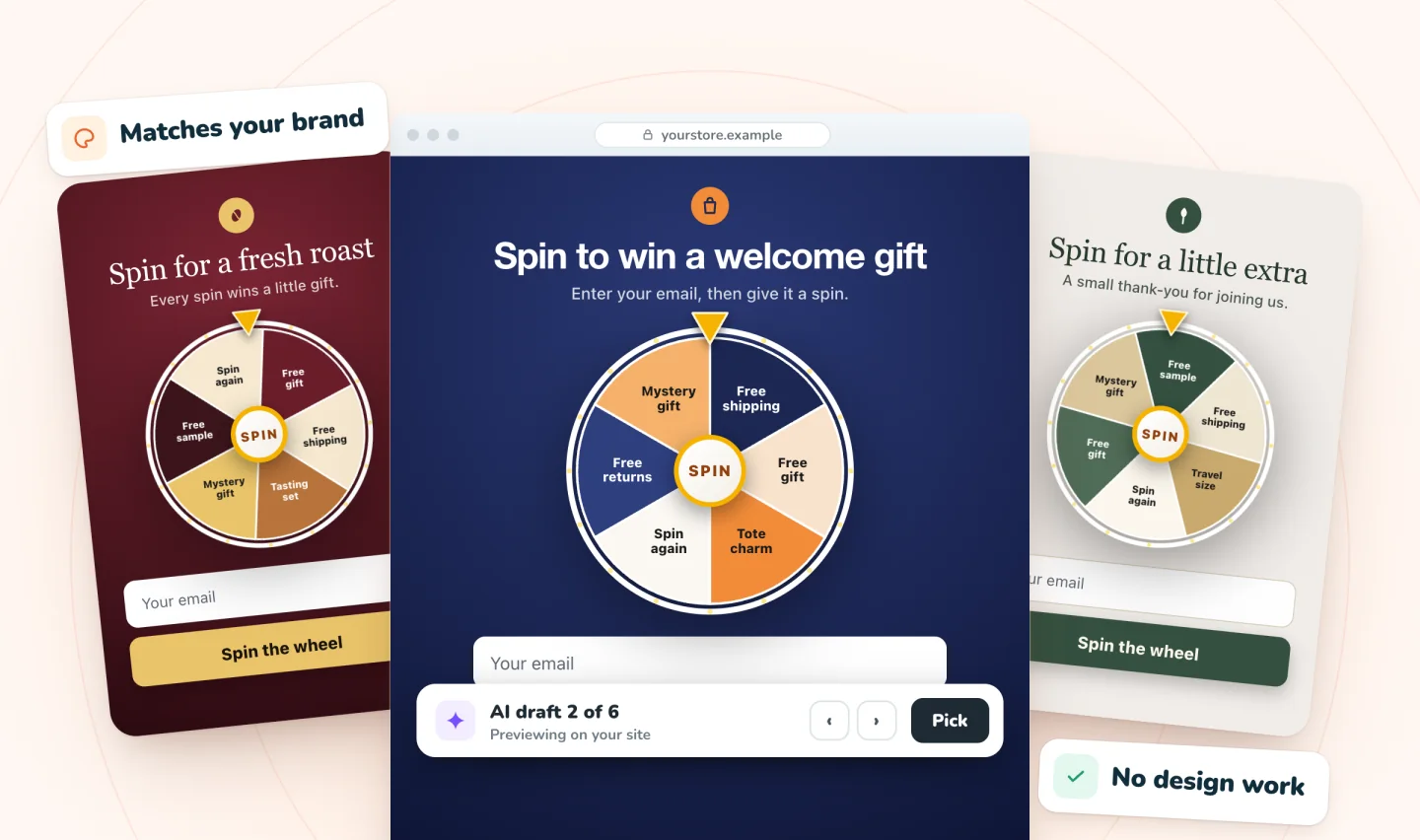
Drafted from your store's look
AI drafts the wheel from your products, colors and fonts, so it doesn't look like a stock template. Preview the drafts on your own pages, keep the one you like, then change any word, color or prize.
- About six to eight slices read best
- Fewer prizes? Repeat the everyday one, and Spin Wheel spreads the repeats around the wheel
- A wheel goes live with at least two different prizes
Set it up on your store
No code to paste. On Shopify you need an online store theme; on Wix, Wix Stores. Either way, at least two different prizes.
On Shopify
Make your prize codes
In your Shopify admin, under Discounts, create a cheap everyday prize, a mid prize and one rare headline prize as discount codes, each with an end date and one use per customer. No codes yet? Spin Wheel's Home can create three starter codes.
Add Spin Wheel
On the Shopify App Store, click Install and approve it in your Shopify admin. It opens in your admin and drafts pop-ups from your theme.
Pick a design and set the odds
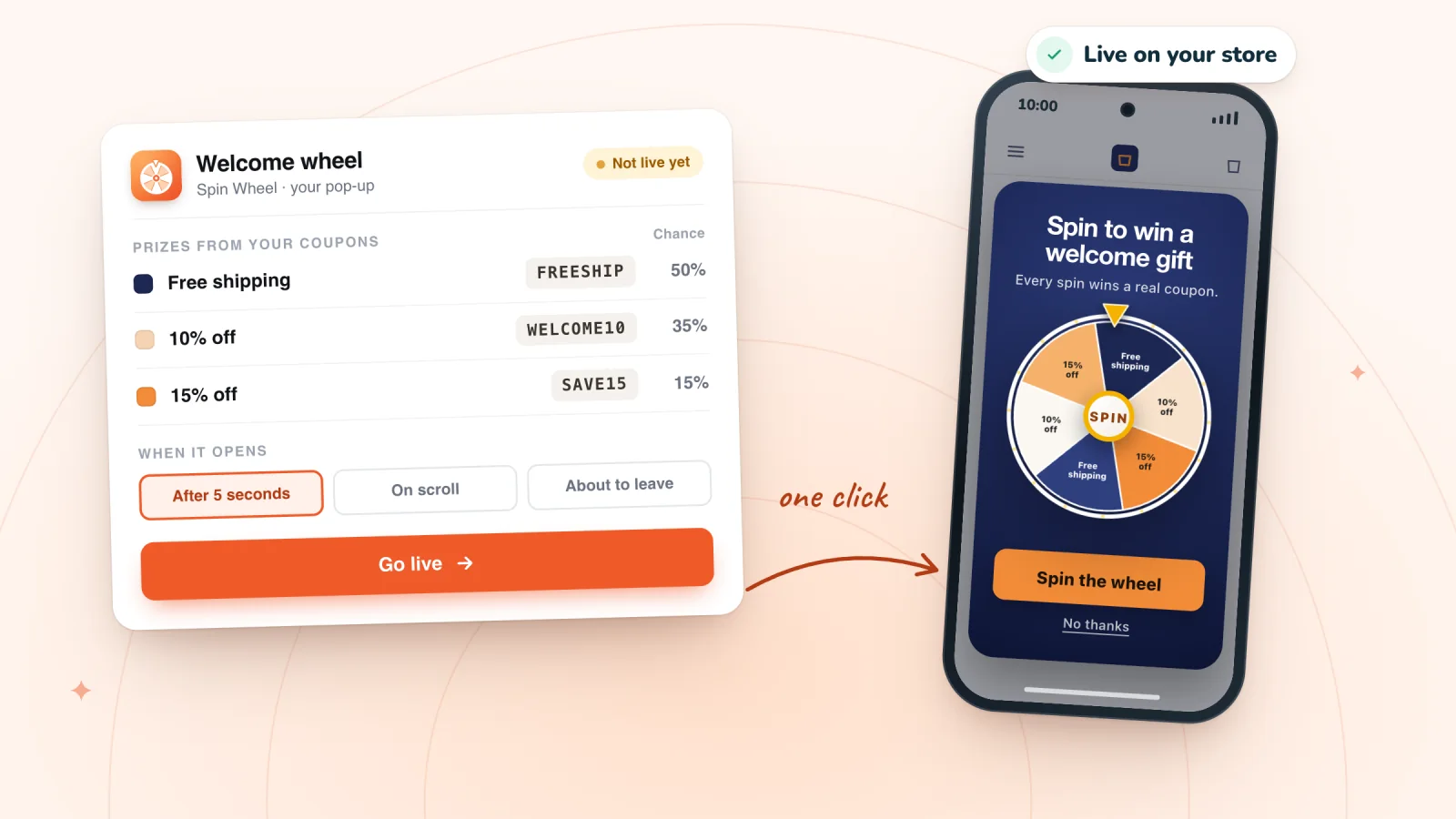
Choose an AI draft, point each slice at a discount code and set how often it comes up. The chances always add up to 100%.
Switch it on and go live
On Spin Wheel's Home, press Turn on in theme editor, check Pop-ups is on and press Save. Then click Go live and check your live store on a computer and a phone.
On Wix
Make your prize coupons
Under Coupons in your Wix dashboard, create a cheap everyday prize, a mid prize and one rare headline prize, each with an end date and one use per customer.
Add Spin Wheel
On the Wix App Market, click Add to Site, then Agree & Add. Spin Wheel opens in your site's dashboard.
Pick a design and set the odds
Choose an AI draft, point each slice at a coupon and set how often it comes up. The chances always add up to 100%.
Choose the moment and go live
Pick when it opens, click Go live, then check your published site on a computer and a phone.
How to add a spin wheel to ShopifyHow to add a spin wheel to Wix
A prize mix that protects your margin
A wheel earns its place when it shows a range: one cheap everyday prize that comes up often, a mid prize or two, and one rare headline prize. Here's the mix from our made-up bag and tote shop:
| Prize | Chance |
|---|---|
| Free shipping | 40% |
| 10% off | 25% |
| Tote charm | 20% |
| 15% off | 10% |
| Mystery gift | 5% |
Spin this mix in the free prize wheel spinner, see what it costs per sign-up in the odds calculator, or browse spin wheel examples by store and occasion, from a coffee roaster's welcome wheel to a Black Friday template. Before you settle on a prize, check what it really costs with this discount break-even calculator, and see prize ideas that protect your margins.
Wondering whether a wheel lifts sign-ups at all? Five pop-up makers' own reports say their wheels convert better than their standard pop-ups, though the rates differ widely and none is for Wix stores. Our guide sets their published numbers side by side.
Why the draw happens on our servers
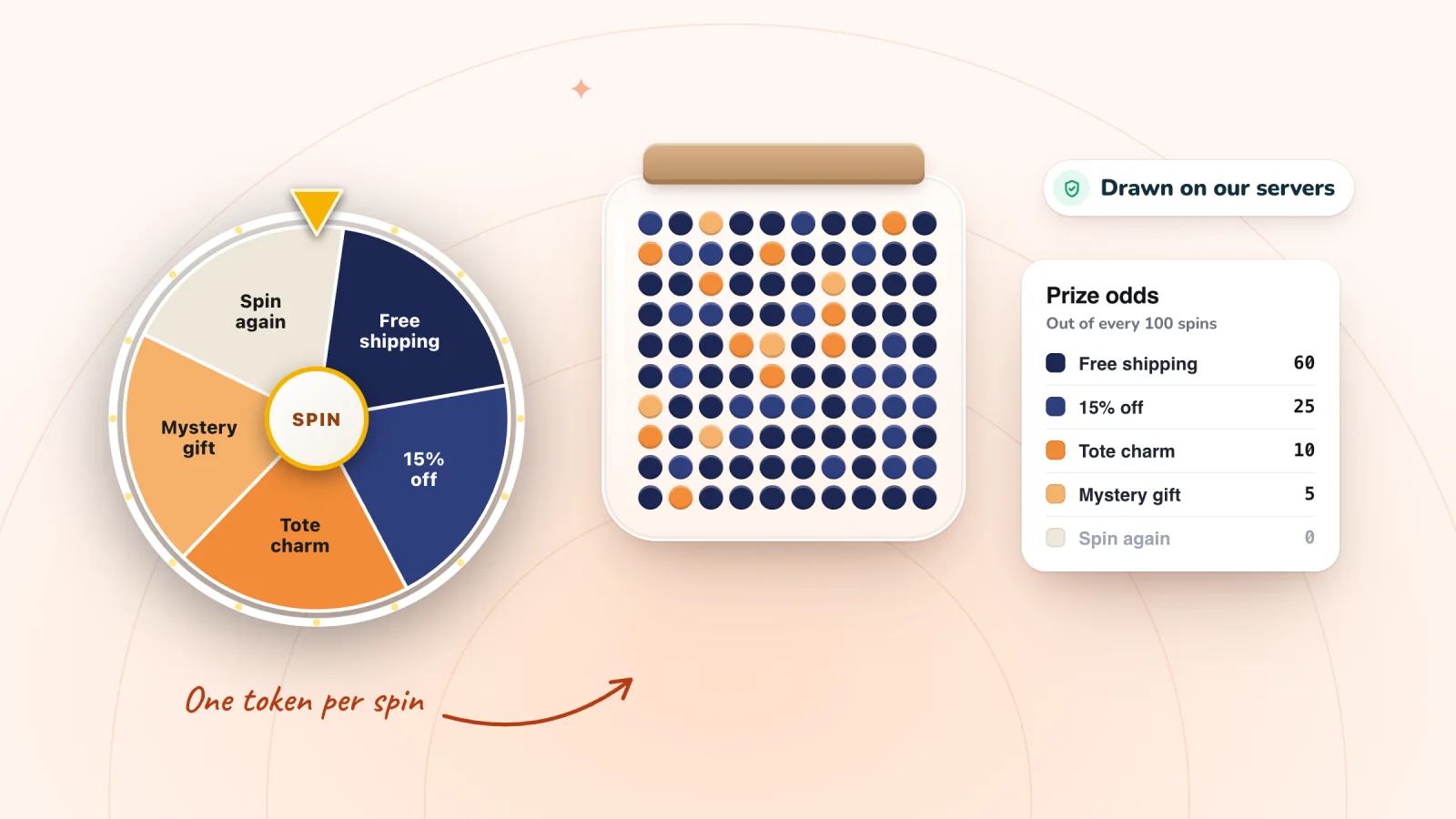
When a shopper spins, our servers pick the prize from the odds you set, and the wheel lands on it. Nothing in the shopper's browser decides the result, so the odds you set are the odds shoppers get, and every spin wins one of your prizes. A decoy slice, such as one showing your logo, can sit on the wheel as decoration, but it's never landed on. More on choosing chances in how to set spin wheel odds. To follow one spin from the draw to the code at checkout, read what happens during a spin.
Terms for your wheel
Publish short terms for the game: who can play, that prizes have different chances, how long a won prize can be claimed and the rules of each prize's code. This spin-to-win terms and conditions template writes them from your settings, and the guide to promotion rules for prize wheels covers the legal side. This is general information, not legal advice.
On phones
On a phone, the wheel opens full screen or in a card sized to the screen, with buttons big enough for a thumb, and one tap copies the winning code. Spin Wheel opens one pop-up per page load, so a shopper who has seen your wheel won't get a second pop-up on top of it.
How do you make a spin-to-win QR code?
Print a QR code that opens a page of your Wix site where your wheel shows. Shoppers at a market stall, craft fair or event scan it and spin on their own phones. Every spin wins, and shoppers sign up to claim a code for your online store.
- Give the stall a page. Add a page with a link to your shop, publish it and copy the page's address.
- Show the wheel only there. In the pop-up's When & who settings, set Pages to Specific pages, paste the address and click Add. Any page whose address contains that path counts, so /market also catches /market-day.
- Open it at once. Set When it shows to Immediately. Leave Devices on All: Mobile means a browser window under 768 pixels wide, and a phone turned sideways can be wider.
- Make the code. On Wix, Wix's free QR code generator, which we checked on October 6, 2026, saves a code for a web address as a PNG, JPEG or SVG file once you log in to Wixel, Wix's design platform, or sign up free. A downloaded code can't be changed, as Wix's help center explains, so don't delete the page or change its address.
- Print it, then test it. Make it big enough to scan from where shoppers stand: Wix's generator page gives 0.8 inches square as the usual minimum, with a clear margin around it. Scan it with a phone that hasn't signed up, since the wheel skips anyone who has signed up in that browser, and on Wix, behind a cookie banner, it waits until the visitor accepts.
Before the day, settle three things:
- Where the code works. Each prize is one of your store's own discount codes, so the sign should say so: "Scan to spin and win a code for our online store."
- Who can use it. Everyone who wins a prize gets the same code, so give each prize coupon one use per customer and an end date soon after the event.
- Which wheel. Your everyday wheel can serve the stall if it shows on All pages, or give the stall a wheel of its own: Spin Wheel runs as many as you like, free. A shopper sees one pop-up per page view, so then move the everyday wheel off that page, for example to Product pages.
Other wheel apps
On Shopify, see free spin wheel apps for Shopify, compared. On Wix, there's no spin wheel of its own, so the choice is between apps and embedded widgets: see how other Wix wheel apps compare, with every fact linked to its source. Weighing one of the apps called Lucky Wheel? See Smartarget's and HDT's Lucky Wheel apps compared with Spin Wheel.
The spin-to-win pop-up at a glance
| Who picks the prize | Our servers, from the odds you set. Every spin wins one of your prizes |
|---|---|
| Order | Spin first, then sign up to claim (the default), or sign up first |
| Claim window | 24 hours after the win by default; you can choose from 1 hour to 7 days |
| When it opens | A few seconds after arrival, on scroll, after a few pages, or as a shopper is about to leave |
| The code | Shown in the pop-up with one tap to copy, plus a backup email for winners who gave an email |
| Price | Free forever: unlimited pop-ups and sign-ups, with every game, on Shopify and Wix |
| With myuser.ai | On Wix the two sync on their own; on Shopify they run side by side, one pop-up at a time |
| What you need | Shopify: a store with an online store theme, with Spin Wheel's Pop-ups embed switched on. Wix: a published site with Wix Stores |
No paid version, no caps. See everything that's free.
Guides to go further
How to Add a Spin Wheel to a Wix Site (With Real Coupons)
Wix has no built-in spin wheel. Compare an app, an embedded widget and a no-game Wix Popup, then set prizes and odds and test the wheel on a phone.
How Spin-to-Win Pop-ups Work, With Shopify & Wix Setup
What happens from spin to checkout: who picks the prize, what a wheel costs, play or email first, what vendors' numbers show, and Shopify and Wix setup.
15 Spin Wheel Prize Ideas for Online Stores, With Costs
15 spin-to-win prize ideas in three levels, from a cheap sample to a rare free product, the coupon or discount code behind each, and how to price them.
Spin Wheel Odds: How Prize Chances Work and What They Cost
Each prize gets a chance out of 100, and every spin draws one by those chances. How to set them, what a split costs and how far results drift by luck.
Frequently asked
Does Wix have a built-in spin wheel?
No. Wix's help center says it's not currently possible to create gamified promos such as "Spin to win" with Wix Promos, and Wix's own Popups have no game inside. A wheel on a Wix store comes from a pop-up app like Spin Wheel or an embedded wheel widget, and the three ways to add a spin wheel to Wix compares them.
How many slices should the wheel have?
About six to eight reads best. If you have fewer prizes, repeat your everyday prize: Spin Wheel spreads the repeats around the wheel, as long as no one prize fills more than half the slices. A wheel needs at least two different prizes to go live.
How long can a winner claim the prize?
24 hours after it's revealed, by default. The pop-up's Time to claim setting offers 1 hour, 6 hours, 24 hours, 3 days or 7 days. Give each prize coupon an end date later than the last day anyone could still claim it.
What do I need?
On Shopify, a store with an online store theme; on Wix, Wix Stores. If you don't have prize codes yet, Spin Wheel can create three starter ones: 10% off, 15% off and free shipping, each once per customer, for a year. On Shopify they're ordinary discount codes under Discounts; on Wix, ordinary coupons in your dashboard.
Also in Spin Wheel
Give your next visitor a reason to sign up
Add Spin Wheel, pick a design AI made from your store, and start collecting sign-ups with prizes that work at checkout.