On this page
To add a spin wheel to Shopify, install a spin-to-win app from the Shopify App Store, switch on its app embed in your theme editor, and back each prize with a discount code from your Shopify admin. The switch is yours to flip: Shopify's developer docs say app embeds "are inactive until an app user turns them on in the theme editor," and that an app can't activate them for you.
Whichever app you choose, the codes matter more than the wheel. A shopper who wins 15% off and then has the code refused at checkout was promised something your store didn't deliver.
Key takeaways
- Make each prize a discount code under Discounts before you add a wheel, with an end date and Limit to one per customer, and leave the total-use limit off, because everyone who wins a prize shares its code.
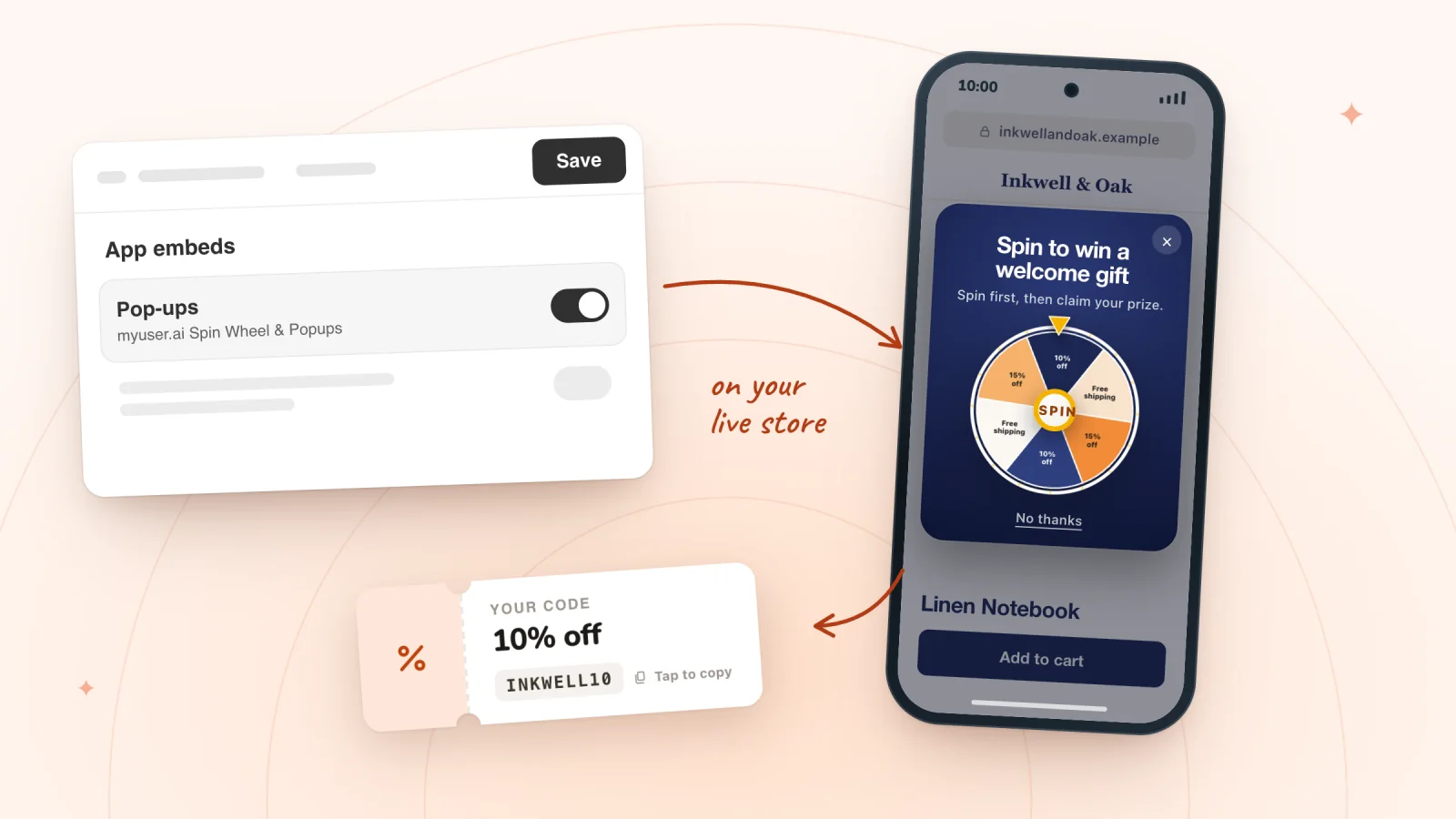
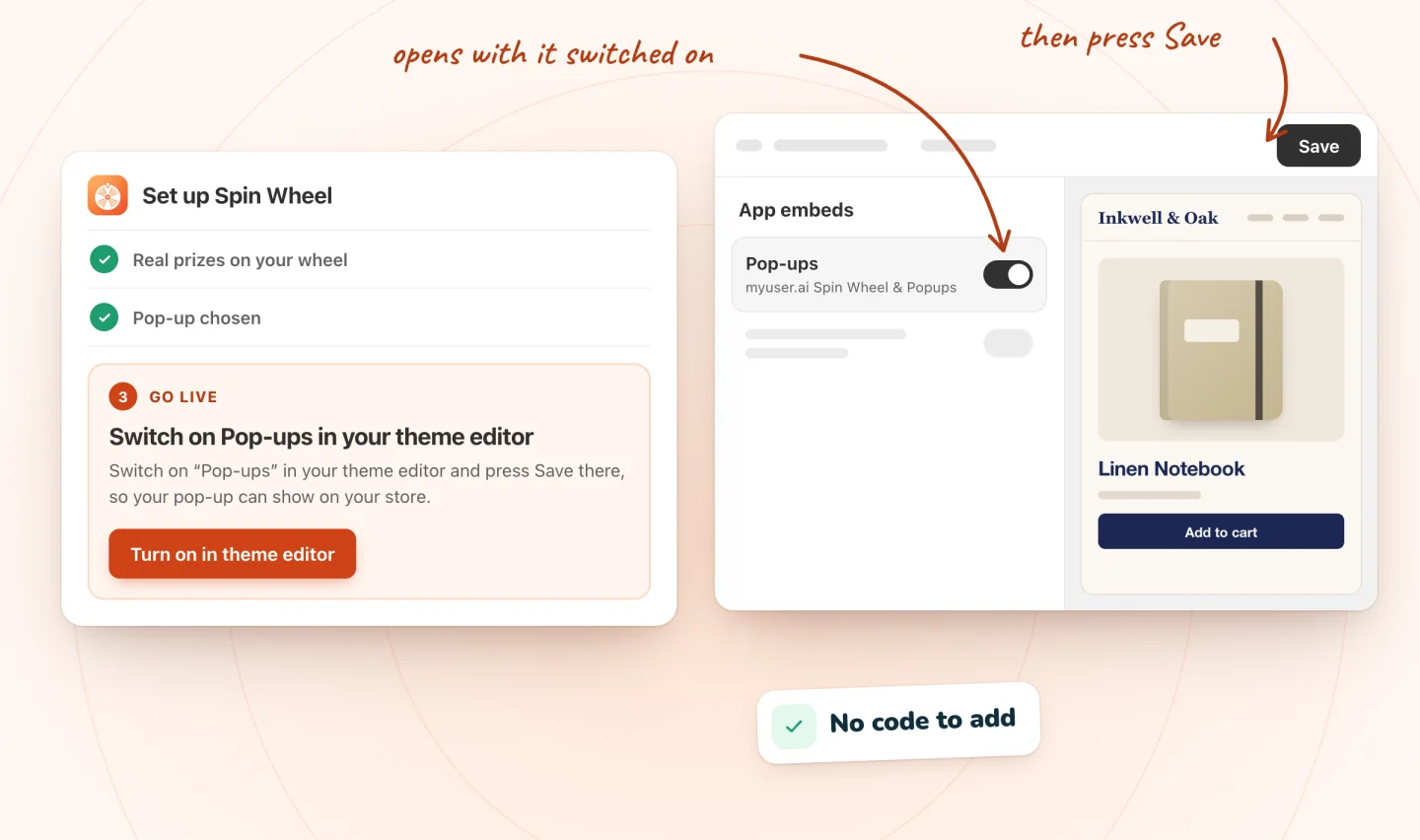
- A wheel app reaches your store through an app embed: switch it on in your theme editor and press Save, since Shopify keeps app embeds off until you do.
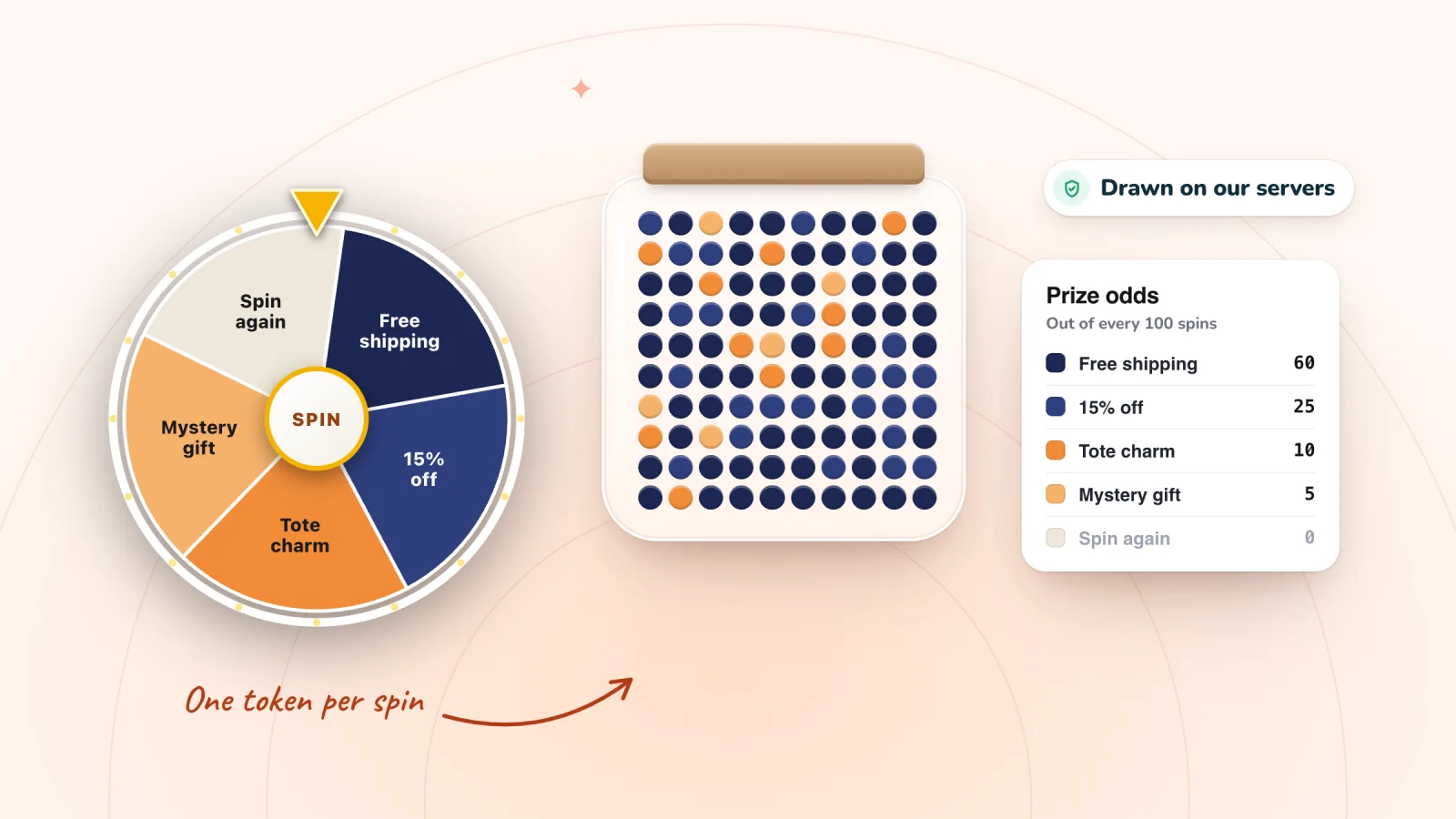
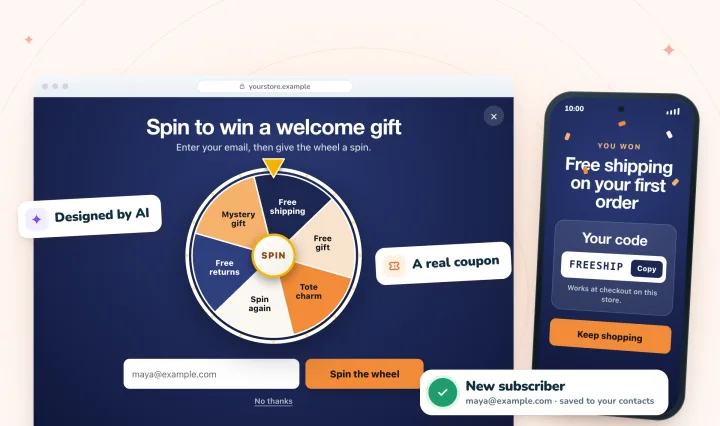
- In Spin Wheel, every spin wins one of your prizes, drawn on our servers from the chances you set, and the code shows in the pop-up, where one tap copies it.
- Test the live store in a private window, not the theme editor, and switch the embed on again after you publish a different theme.
The routes, side by side
| What to compare | A wheel app (Spin Wheel) | Shopify Forms and a discount code |
|---|---|---|
| Where it appears | A pop-up over your store's pages, through an app embed in your theme | A pop-up or inline form from Shopify's own free app |
| Game | Spin wheel, scratch card or gift box | None in its App Store listing |
| Where the codes come from | Your store's discount codes, one picked per prize | A discount you offer for signing up |
| Cost | Free forever, with unlimited pop-ups and sign-ups | Free, as listed |
A quick way to choose:
- You want a game, with prizes from codes you already manage: use a wheel app. Free spin wheel apps for Shopify, compared shows what each listing offers for free.
- A plain sign-up form is enough: Shopify Forms, Shopify's own free app, adds pop-up and inline forms and can offer a discount for signing up.
- You want each winner to get a single-use code of their own: Spin Wheel gives everyone who wins a prize the same code, so pick a wheel app that lists unique codes, or send single-use codes in a welcome email instead. Here's when a shared code is fine, and how to keep it from leaking.
Before you start, make the discount codes
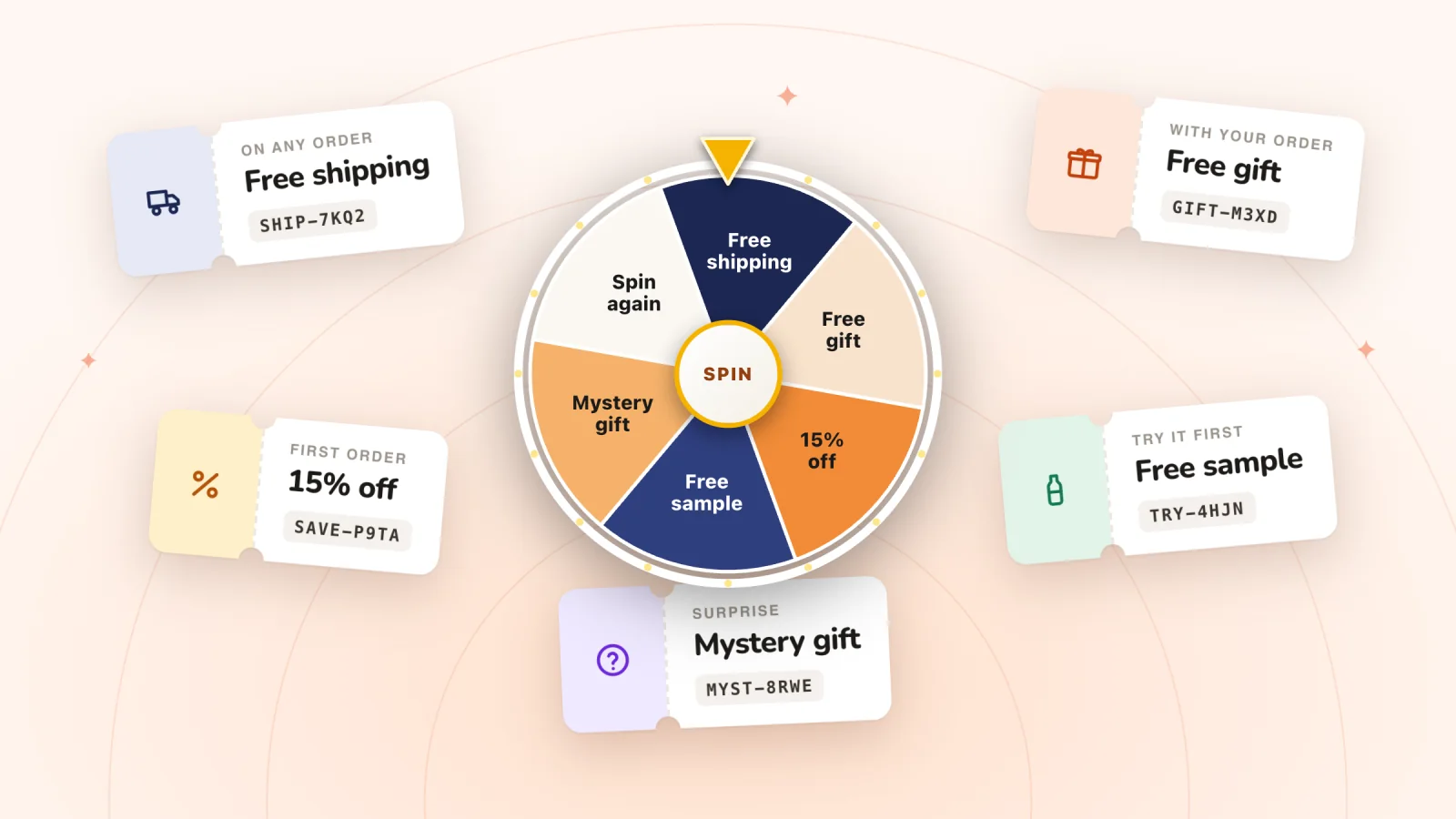
A wheel only hands out codes. The discount itself lives in your Shopify admin, so make those first: go to Discounts, click Create discount, pick a type such as Amount off orders or Free shipping, and keep Discount code as the method. Make one for each prize: a cheap prize that comes up often, a mid prize and one rare headline prize.
Four settings matter for a prize code:
- An end date. Under Active dates, click Set end date. Shopify's help center says a code without one doesn't expire.
- Limit to one per customer. Tick it under Maximum discount uses. Shopify tracks it by the customer's email address or phone number.
- No total-use limit. Leave Limit number of times this discount can be used in total unticked. Everyone who wins a prize gets the same code, so a code capped at 100 uses turns away the 101st winner at checkout, right after the pop-up said they'd won.
- A minimum purchase on dollar-off prizes. Under Minimum requirements, choose Minimum purchase amount, so $10 off can't wipe out the price of a $12 notebook.
Spin Wheel can't use every discount as a prize. An automatic discount has no code to show, a code limited to one use in total would be spent by the first winner, and a discount that holds more than three codes, such as a bulk-generated set, isn't offered as a prize either.
Set up Spin Wheel on Shopify, step by step
Spin Wheel is our app. To weigh the alternatives first, see free spin wheel apps for Shopify, compared.
- When Spin Wheel is on the Shopify App Store (from November 18, 2026), install it there and approve it in your Shopify admin.
- Wait a moment while Spin Wheel reads your theme's logo, colors and fonts, your products and your discount codes, then drafts your first pop-ups with AI.
- Switch on Pop-ups in your theme editor. Turn on the app embed on Spin Wheel's Pop-ups page, or Turn on in theme editor on its Home, opens the editor at App embeds with Pop-ups switched on. Press Save there.
- On the Pop-ups page, choose the drafts you want to keep. Spin Wheel can show them on your real pages, with a picker bar along the bottom, so you see each one as a shopper will.
- Check the prizes: point each slice at one of your discount codes and set how often each one comes up. The chances always add up to 100%, so raising one lowers the others. Keep the headline prize rare.
- Click Go live on Spin Wheel's Home.
- Open your live store in a private window and play.
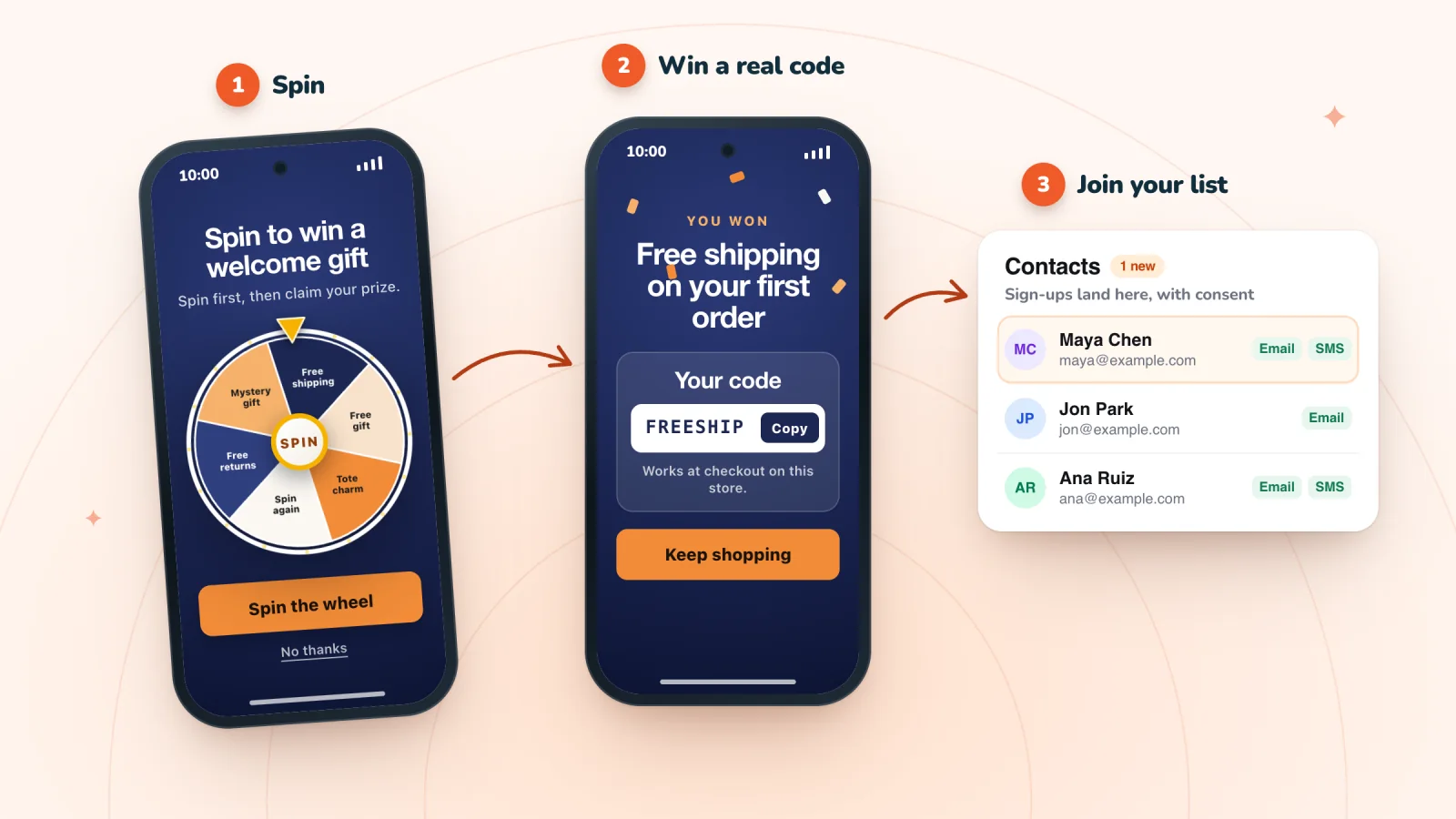
At install, Spin Wheel asks for access to your theme, products, discount codes and customers. Shoppers can play first and enter an email to claim the prize, or give the email before the game: it's one setting, Let them play first. Either way the code appears in the pop-up, where one tap copies it, and winners who gave an email also get a backup copy by email.
Spin Wheel lists every sign-up on its Submissions page, and phone numbers join for texts only with their own tick. It doesn't send marketing emails or texts itself, so your welcome email comes from the tool you already use.
Put a spin-to-win pop-up on your store
AI designs it from your brand, every spin wins one of your store's own discount codes, and every sign-up is saved with consent. Free forever.
Prizes and odds that protect your margin
A wheel costs you its average prize, weighted by how often each one comes up. Say Inkwell & Oak, a stationery store, has a typical order of $36 and pays $5 to ship one:
| Prize | Chance | What it costs when used | Weighted cost |
|---|---|---|---|
| Free shipping | 45% | $5.00 | $2.25 |
| 10% off | 45% | $3.60 on a $36 order | $1.62 |
| $8 off orders over $45 | 10% | $8.00 | $0.80 |
| Average cost per prize, if every winner uses it | 100% | $4.67 |
Each line is the cost times the chance, and the three add up to $4.67, while a flat 15% off for everyone would cost $5.40 on the same order. Put your own numbers into the spin wheel odds calculator, pick from these prize ideas with their costs, and spin your mix a few dozen times on the prize wheel spinner to feel how a weighted draw behaves. In Spin Wheel, our servers draw each prize from the chances you set, so editing the page can't change the result. Here's why the draw belongs on a server.
Test it before you tell anyone
Run through this once on a computer and once on a phone:
- Use your live store. Spin Wheel's pop-ups don't show inside the theme editor, so open your store's address the way a shopper would.
- Open a private window. By default a pop-up shows once per session, and Spin Wheel stops asking anyone who has signed up in that browser, your test sign-up included.
- Your cookie banner won't hide it. On Shopify, Spin Wheel's pop-ups can show before a shopper answers the banner. What waits is the tracking: Spin Wheel counts pop-up views and sets its visitor cookie only after the shopper allows analytics, and hands a sign-up to Shopify's visitor tools only after they allow marketing. The shopper's browser keeps a note of which pop-ups they've seen and whether they've signed up, so they aren't asked twice.
- Test one pop-up at a time. Once one of your pop-ups or slide-ins opens, no other opens until the page reloads, whether it comes from Spin Wheel or myuser.ai. Banners can show beside it.
- Wait for the trigger. For exit intent on a computer, scroll or move the mouse first, wait a couple of seconds, then move the cursor up past the top of the window. On a phone, scroll down the page, then flick quickly back up.
- Play and claim. The code should appear in the pop-up, and if you claimed with an email, the backup copy should arrive.
- Use the code at checkout. Paste it in, and if the prize has a minimum purchase, try a cart just under it too.
- Find your test sign-up on Spin Wheel's Submissions page.
Published a different theme since? Shopify's help center says apps' embeds aren't active by default in a newly published theme, so switch Pop-ups on there too and press Save.
If nothing opens, work through why a Shopify pop-up isn't showing. To check the rest of the pop-up, from the close button to the form fields, run a 10-minute test for common pop-up mistakes.
What it can't do on Shopify
- Show on checkout pages. Shopify's developer docs say app embeds can't be rendered on checkout pages, such as contact information, shipping method, payment method and order status. The wheel belongs on your store's own pages.
- Skip the theme editor. Shopify keeps app embeds off until you switch them on in your theme editor and press Save, and no app can do that step for you.
- Send marketing emails or texts. The one email it sends is the backup copy of a won code, so welcome emails and reminders come from your email tool.
- Give each winner a code of their own. Everyone who wins a prize gets that prize's code, which is why the settings above matter.
Frequently asked questions
Does Shopify have a built-in spin wheel?
Shopify's own free form app, Shopify Forms, makes pop-up and inline sign-up forms and can offer a discount for signing up. Its App Store listing, as we read it on October 29, 2026, describes no wheel or other game. For a spin wheel, stores add a spin-to-win app that runs through an app embed in the theme, with a discount code behind each prize.
Is there a free spin wheel app for Shopify?
Yes. Spin Wheel is free forever, with unlimited pop-ups and sign-ups and no charges on your Shopify bill. Many other wheel apps cap their free plans by impressions, views or visitors, or have none: free spin wheel apps for Shopify, compared lists what each listing says.
Will the prize codes work at checkout?
Yes, as long as each prize's discount code is active and its rules fit the shopper's cart: its dates, any minimum purchase and the one-per-customer limit. Spin Wheel's prizes are your store's own discount codes, and it hands out a code only while its discount is active. Test each prize code in your own cart before the wheel goes live.
Can shoppers lose on the wheel?
No. In Spin Wheel every spin wins one of your prizes, drawn on our servers from the chances you set. A slice with no discount code behind it, such as one showing your logo, can sit on the wheel for looks, but it's never landed on.
Where do Spin Wheel sign-ups go?
To Spin Wheel's Submissions page, with the pop-up, the time and the prize, and Download CSV saves the list as a file.
Does Spin Wheel work with my theme?
Yes, with vintage and Online Store 2.0 themes alike: Shopify's developer docs say app embeds work in both, because they don't rely on sections or JSON templates. Switch on Pop-ups in the theme your store has published.
Why isn't my wheel showing?
Usually because Pop-ups isn't switched on and saved under App embeds in your live theme, or because you're looking inside the theme editor, where Spin Wheel's pop-ups don't show. Why a Shopify pop-up isn't showing covers the rest.
Try it on your store
Spin Wheel turns your store's own discount codes into prizes, drafts the design from your theme and is free forever. Start with the codes, then switch on the wheel. See the spin-to-win pop-up with prizes and odds you set.

Sources
- Extend your theme with apps, Shopify Help Center
- Configure theme app extensions, Shopify developer docs
- Migrate to theme app extensions, Shopify developer docs
- Discount codes, Shopify Help Center
- Amount off discounts, Shopify Help Center
- Free shipping discounts, Shopify Help Center
- Shopify Forms, Shopify App Store listing
We read each of these pages on October 29, 2026.

We build marketing apps for online stores: myuser.ai writes and sends emails and texts from a store's own products, and we make Spin Wheel and Session Recordings, free apps for online stores. Product details in our guides are checked against the apps themselves.